A simple picoCTF forensics writeup where a broken BMP header hides half an image and one very disrespectful fake flag.
Today, we are doing another forensics challenge.
Yesterday, I opened images hidden inside other images. Today, I somehow ended up repairing an image byte by byte.
Forensics is progressing quickly.
My confidence is not.
The challenge gave us a file called:
tunn3l v1s10n
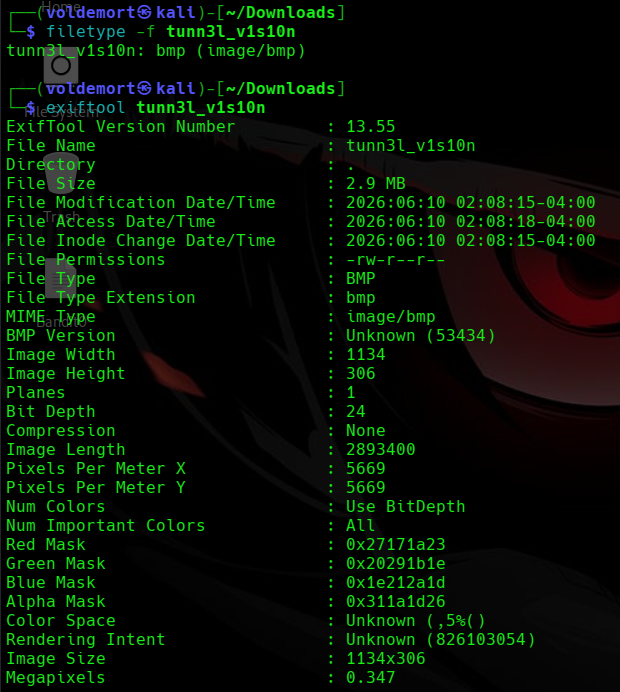
I started by checking the file with file and ExifTool:
file "tunn3l v1s10n"
exiftool "tunn3l v1s10n"
Both identified it as a BMP image.
BMP stands for Bitmap Image File. It is an older image format that stores information such as the image dimensions, colour depth, pixel-data location, and the pixel data itself inside a structured header.
BMP files are often uncompressed, which makes them much larger than JPEGs or PNGs. However, that simple structure also makes their headers easier to inspect and repair manually.
Which was convenient, because this BMP was clearly going through something.
The Image Would Not Open
I tried opening the file to see the magical picture inside.
It refused.

The image viewer returned this error:
Unknown bitmap header, size 53434
I will be honest.
At that moment, 53434 meant absolutely nothing to me.
But the words “unknown bitmap header” strongly suggested that the image data might still exist while the header had been damaged or modified.
So I decided to inspect the file as hexadecimal data.
Inspecting the BMP Header
My first move was to run xxd without any options.
That printed enough hexadecimal data to cover my screen, my terminal history, and probably my future children’s screens too.
So I tried again, this time limiting the output to the first 64 bytes:
xxd -g 1 -l 64 "tunn3l v1s10n"
The options mean:
-g 1 Display one byte per group
-l 64 Read only the first 64 bytes
The output was:
00000000: 42 4d 8e 26 2c 00 00 00 00 00 ba d0 00 00 ba d0 BM.&,...........
00000010: 00 00 6e 04 00 00 32 01 00 00 01 00 18 00 00 00 ..n...2.........
00000020: 00 00 58 26 2c 00 25 16 00 00 25 16 00 00 00 00 ..X&,.%...%.....
00000030: 00 00 00 00 00 00 23 1a 17 27 1e 1b 29 20 1d 2a ......#..'..) .*
Naturally, as a small and humble human rather than a DEF CON final boss, I did not immediately understand what any of that meant.
So I searched for the structure of a BMP header.
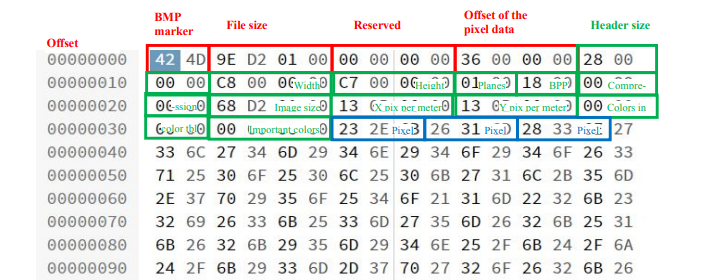
The diagram showed that a BMP file mainly contains three parts:
-
The BMP file header
-
The DIB or image-information header
-
The actual pixel data
With the diagram beside the hex dump, the numbers finally stopped looking like ancient Minecraft enchantment-table text.
Reading the BMP Signature
The first two bytes were:
42 4d
In ASCII, these bytes represent:
BM
That is the standard signature for a BMP file.
So the file was definitely supposed to be a bitmap image. It was not pretending to be one for tax reasons.
Checking the File Size
The next four bytes were:
8e 26 2c 00
This field stores the total file size.
BMP stores multi-byte values in little-endian order, meaning the least significant byte appears first.
Reversing the bytes gives:
00 2c 26 8e
Written as a hexadecimal number:
0x002c268e
Instead of calculating that manually and creating new problems for myself, I let Linux convert it:
printf "%d\n" 0x002c268e
The result was:
2893454
So the file header claimed that the complete file was:
2,893,454 bytes
That value matched the actual file size, so this part of the header appeared correct.
One field down.
Several suspicious bytes still waiting.
Finding the Corrupted Header Values
After the file-size and reserved fields, I reached:
ba d0 00 00
Because BMP uses little-endian byte order, this becomes:
0x0000d0ba
In decimal:
53434
This field stores the pixel-data offset.
In simple terms, it tells the image viewer:
Skip this many bytes, and the actual image begins there.
The file was claiming that its pixel data began at byte 53,434.
That seemed strange.
The same value appeared again immediately afterward:
ba d0 00 00
This second field stores the size of the DIB header.
That explained the original error:
Unknown bitmap header, size 53434
The image viewer thought the information header itself was 53,434 bytes long.
The file was basically saying:
My header is enormous. Please do not ask follow-up questions.
Unfortunately for the file, I had follow-up questions.
Working Out the Correct Values
For a basic 24-bit Windows BMP, the usual structure is:
14-byte BMP file header
40-byte BITMAPINFOHEADER
Therefore, the actual pixel data should begin after:
14 + 40 = 54 bytes
In hexadecimal:
54 = 0x36
Stored in little-endian format:
36 00 00 00
The standard DIB-header size is 40 bytes:
40 = 0x28
Stored in little-endian format:
28 00 00 00
So the two corrupted fields:
ba d0 00 00 ba d0 00 00
needed to become:
36 00 00 00 28 00 00 00
Repairing the First Part of the Header
I opened the file using hexedit:
hexedit "tunn3l v1s10n"
Then I replaced:
ba d0 00 00 ba d0 00 00
with:
36 00 00 00 28 00 00 00

After editing the values, I saved the file and opened it again.
This time, the image loaded.
Victory.
Or so I thought.
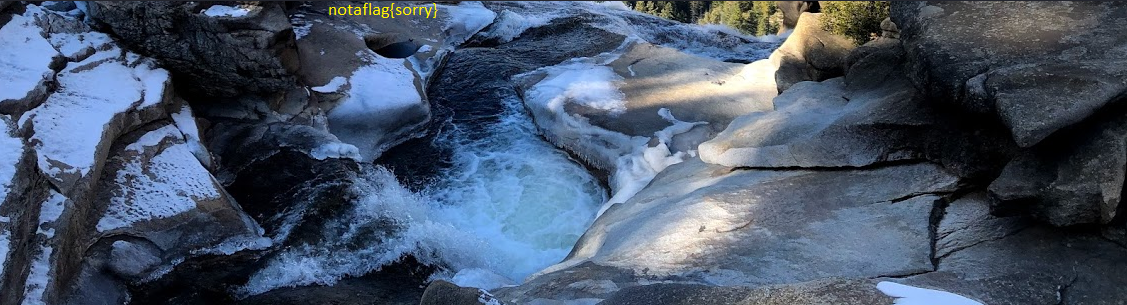
The image displayed:
notaflag{sorry}
I had inspected a binary header, learned little-endian byte order, and repaired two corrupted fields just for the image to say “sorry.”
Thank you, picoCTF. Very cool.
Realising the Image Was Still Incomplete
The image opened, but something still looked wrong.
It was unusually short, and the message was clearly designed to distract me rather than finish the challenge.
While looking at one of my short king friends who had arrived to disturb my peace, I suddenly realised something.
Maybe the image was also short.
Coincidence?
Probably.
Useful coincidence?
Absolutely.
I checked the width and height values stored in the header:
Width: 6e 04 00 00
Height: 32 01 00 00
Converting the little-endian values gave:
Width: 0x0000046e = 1134 pixels
Height: 0x00000132 = 306 pixels
So the image viewer was displaying the bitmap as:
1134 × 306
However, the file contained much more pixel data than an image only 306 pixels tall should need.
The BMP was not missing data.
It was being told to stop reading too early.
Calculating the Real Height
The BMP header contained the following image-size field:
58 26 2c 00
Reversing the byte order gives:
0x002c2658
In decimal:
2,893,400 bytes
This represents the total size of the pixel data.
The bitmap used a colour depth of 24 bits per pixel:
18 00 = 0x18 = 24 bits
Since 24 bits equals 3 bytes, each pixel requires:
3 bytes
The width was 1134 pixels, so one row initially required:
1134 × 3 = 3402 bytes
However, BMP rows must be aligned to a multiple of four bytes.
3402 is not divisible by four, so two padding bytes must be added:
3402 + 2 = 3404 bytes per row
Now I could calculate the real image height:
2,893,400 ÷ 3,404 = 850
Therefore, the actual height was:
850 pixels
So the file claimed to be 306 pixels tall while secretly carrying enough pixel data for 850 pixels.
Short on paper.
Tall in spirit.
Converting the Correct Height to Bytes
The correct height was:
850
Converting that into hexadecimal gives:
850 = 0x00000352
Because the BMP header uses little-endian order, it must be stored as:
52 03 00 00
The original height bytes were:
32 01 00 00
So I replaced them using hexedit again with:
52 03 00 00
The corrected dimensions were now:
Width: 1134 pixels
Height: 850 pixels
Because the height value is positive, the BMP stores its pixel rows from the bottom upward.
The incorrect height of 306 told the image viewer to display only 306 rows from the bottom of the file. The remaining rows, including the real flag, were ignored.
By changing the height to 850, I told the viewer to stop being lazy and read the whole image.
Revealing the Real Flag
After saving the corrected height and reopening the file, the previously hidden upper section became visible.
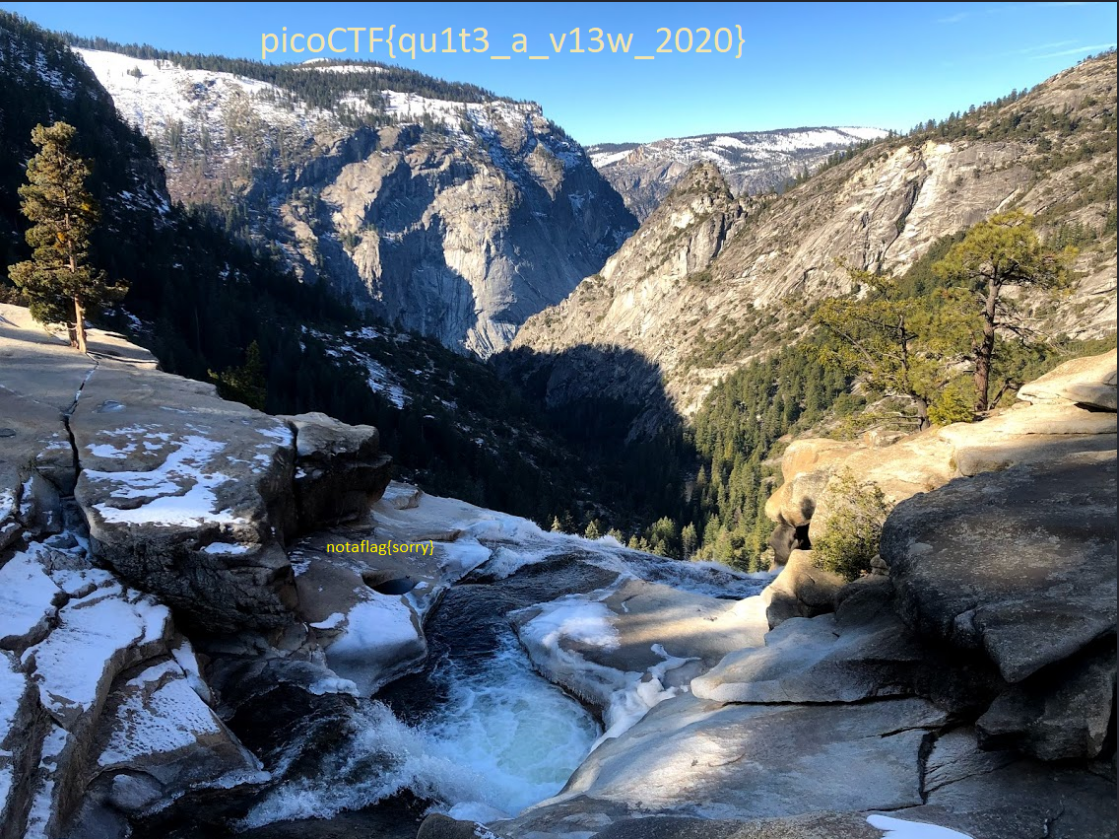
This time, the image finally contained the actual flag.
No apology.
No fake flag.
Just the answer.
Flag
picoCTF{qu1t3_a_v13w_2020}
Closing Thoughts
This challenge was more technical than Matryoshka Dolls, but it was also much more satisfying.
The image data itself was never missing or encrypted.
The BMP header was simply lying about how the image should be interpreted.
The first repair corrected:
Pixel-data offset: 54 bytes
DIB-header size: 40 bytes
That allowed the image to open.
The second repair corrected:
Height: 306 → 850 pixels
That revealed the hidden upper portion containing the real flag.
The main lesson from this challenge is that a corrupted image does not always mean the image data itself is damaged.
Sometimes the pixels are perfectly fine.
The header is just confidently wrong.
The challenge also taught me that fixing a file does not always reward you immediately.
Sometimes the file makes you repair it twice and insults you between attempts.